Notebook Hard Drive Upgrade Week!

This week has been a little busy! Two of my Notebooks, my Acer TM 6292 Windows XP Machine and my MacBook Pro, were both running out of hard drive space. Last week I was able to pick up a couple of 320 GB 7200 RPM Western Digital Notebook drives from one of my suppliers. I have spent the last day and a half upgrading the drives in these machines.

The Acer was a piece of cake as the hard drive is easy to replace. The MacBook Pro on the other hand was a little more difficult as the drive is in the chassis. While I feel comfortable taking apart laptops the MBP scared me a little as opening it voids your warranty unless it is done by an Apple Authorized Service Centre.

I took the MBP into a local Apple dealer and had them do the hard drive upgrade (30 minutes of labour) and I just picked up the machine this afternoon. I am currently in the process of restoring the OSX system but it has not been as easy as the Windows XP restore. The next step will be for me to try and restore the BootCamp Windows Vista partition.

I have been anxious to the MAC done because a few new applications this week I want to try on my MAC (Microsoft released the Live Mesh MAC client this week) as well as the release of the new version of Adobe PhotoShop Lightroom.

I will include step by step instructions of what I used and how I did the upgrades soon under my “how to” category so if you ever want to upgrade a hard drive in a PC or Notebook (as well as the MAC) I will provide step by step instructions of what you need and how to complete the task.


Flip Video Ultra, Canadian Retail Sighting!

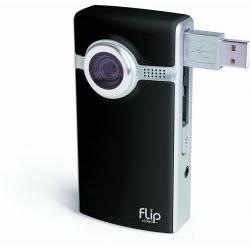
A couple of weeks ago, I started looking at a Flip Ultra Video camera again and where I could get one in Canada. Unfortunately there were no Canadian resellers. The Flip Ultra is a small (slightly bigger than an iPod Classic) solid state video camera. These cameras are tiny and designed to go into your pocket to be where ever you want to take them. They shoot 640 x 480 (VGA) video onto internal memory. You can view what you are shooting via a 1″ LCD screen on the back of the camera. The camera also features a USB connector that flips up to connect to a PC or Mac to download or edit the videos. While the videos aren’t designed (and frankly don’t even look good) on a large TV screen they are an ideal size for uploading to YouTube or other video sharing sites. For more info on the Flip you can go here, http://www.theflip.com.
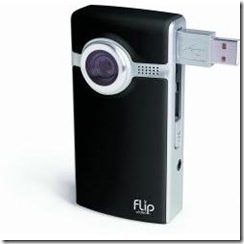
flip There are several of these cameras that are available now, including the RCA Small Wonder EZ201 and Kodak has just released a new model in the US. There are also several other types of these cameras from off brand Chinese companies. I myself have an RCA Small Wonder that I got for myself last year from Ebay and we also got one for my 7 year old son when he wanted his own video camera. He loves it!

The problem is none of these cameras are available on Canada. In the past you had to purchase from Ebay or while travelling in the states. You could get a Flip via www.tigerdirect.ca however.

Well this past Monday while wandering through the electronics department of our local Wal-Mart (I do it every visit), I spotted a Flip Ultra in a box. Looks like Wal-Mart Canada has started selling the 2GB Flip Ultra for 158.64. This camera will record 60 minutes of video to it’s 2 GB of memory.

From what we have been reading is that although the technology between the Flip and the RCA Small Wonder EZ201 is virtually identical, the video quality especially in low light on the Flip. The Flip also works on a Mac system. However the Small Wonder has an SD slot so that you can add additional SD cards it also comes with a USB extender in case you need more room to plug in to your computer.In addition the LCD screen of the Small Wonder also flips out so that you can self record with it. However once again the RCA Small Wonder is not available in Canada at this time.

Unfortunately neither is the Flip Mino, which is a smaller version of the camera with rechargeable batteries (the Ultra runs on 2 AAs), at least at the time of this writing.

Flip also has an underwater housing available for the Flip Ultra, that allows you to take the Ultra down to depths of 30′ (although deeper depths have been reported). A word of caution however, the fit on the case is not perfect and there have been issues with accessing the power button. Also care has to be used with any underwater housing as a single grain of sand or a hair between the o-ring and the chassis could cause the enclosure to leak.

While these mini video cameras do not replace a full fledged DV camcorder, they are ideal for younger kids wanting a video camera or just to carry around with you every where you go so that you can record video without the bulk of a camcorder!

Adobe Releases Lightroom 2.0!

A little behind on the news here. Monday July 28th Adobe released the latest version of their Lightroom product version 2.0. The beta has been downloadable for several months now and it offers a number of new features including
Multiple Monitor Support
64 Bit Compatibility
Improved Speed
Improved integration with Photoshop
Localized corrections.

Upgrade price for Lightroom 1 users is 99.00 USD, and we were a little disappointed to see the price of a new version being left at 299.00 USD. Apple’s Aperture 2.0 price was lowered to 199.00 USD a few months ago and I was hoping that Adobe would have followed with Lightroom pricing, albeit that Aperture requires a Mac but Lightroom runs on PCs and Macs.

If you have read our review of Lightroom 1, you’ll know that it is an application that we would be lost without and we highly recommend it for anyone that takes lots of digital photos. I had downloaded the Beta of version 2.0 but didn’t do a lot with it. I have also downloaded the 30 day trial version of version 2.0 and played with it a little before taking the Macbook Pro in for a Hard Drive upgrade. In short it was noticeably faster than version 1.0. I am expecting to get my Macbook Pro back today or tomorrow (with a new 320GB 7200 RPM Drive) and will be purchasing the full version as soon as the machine is ready.

Retail box copies should be available within the next two to three weeks, but you can purchase and download right now directly from http://www.adobe.com.


Interesting Microsoft Study

CNet news today has published a story about a unique study that Microsoft recently did. They took a number of XP users that had negative impressions of Windows Vista, put them on video and showed them and had them play with a new Microsoft Operating system code named Mojave. More than 90% gave positive feedback. Then they told the users it was Windows Vista!

The full article is available here http://news.cnet.com/8301-13860_3-9998336-56.html?tag=blog.1

Just goes to show that Vista has been getting a lot of unfair press, and that many of the skeptics have not used it. Most people’s opinions have been formed by listening to other people’s opinion.

We have been deploying Vista since day 1 and have not had any problems with the OS.


Lower Priced Canadian Data Plans, Well Sort of!

One of the things that I was hoping when the iPhone was released in Canada was that Apple would make Rogers offer affordable data plans then that would carry over to the other carriers. Well anyone who read my post on the original iPhone plans that Rogers was offering knows that didn’t happen. In fact Apple was also disappointed and withdrew the sales of iPhones from their own stores in Canada.

Well Rogers did back down a little after the outcry and announced a few days before the iPhone release that they were offering a 30.00 per month 6 GB data plan. This is much better and is more in line with what AT&T and other carriers in the States offered.

I happened to be checking out the Rogers web site earlier this week and was looking at the High Speed PC cards for laptops. I have one of these cards (an EVDO AirCard from Telus) that I share for work when I am on call. It is really nice allowing me to connect my laptop from virtually anywhere. I have been looking at these for a whole but have never purchased one because of the monthly price. Basically in Canada with all of the carriers the plans are about 100.00 per month for 2 GB of traffic. The other alternative I had been looking at was the Rogers Portable Internet Service which is much more affordable but not as mobile as it can’t switch towers and you have to have an AC Outlet (or an inverter in your car) to use the modem.

Like I sad I was browsing the Rogers site and the High Speed PC Cards when I clicked on the link for the plans. Right at the top of the list (and as a limited time offer till August 31) was a 30.00 per month 6GB plan! I called the corporate sales number and asked one of the reps. He wasn’t aware of it but said if it was on the site it was true! I was out a little later in the day and I decided to stop in a Rogers store to just see the iPhone and I asked the sales person there. Again she indicated that if it was on the website it was true.

After a few days of hemming and hawwing, I called the corporate sales rep yesterday and once again confirmed that the modem was available with the plan. Because I am already a Rogers customer it was easy and I was done in less than ten minutes. I ordered the USB modem (which I got for 49.99) and the 30.00 per month 6 GB Data Plan. My modem should arrive sometime tomorrow and I will advise on how things go.


Did Pressure Work? Rogers Caved on iPhone, at Least Temporarily.

Rogers put out a press release this morning indicating a promotional data plan for the iPhone 3G. Anyone who activates a new iPhone 3G before August 31st can get a 6GB Data Plan on top of any voice plan for 30.00 per month. While not unlimited data as what is being offered in the US by AT&T at least it is better than the plans that Rogers had originally offered.

Rogers came under a lot of fire for the pricing on the data plans that they first announced on June 28th and many people were calling for others to boycott and not buy the new iPhone.

While this option is better than anything previously offered it is only a limited time promotional plan.

Canadians are still third world when it comes to cell phone plans and pricing. Our voice and data plans are ridiculously expensive and limited compared to the rest of the world (there are African countries with better pricing). More evidence of this was brought forward yesterday when both Telus Mobility and Bell Mobility announced they would start charging .15 per incoming text messages for users with no text plans on their plans.  Last night a family friend indicated she received a spam text to her phone on the Telus Mobility network. Very shortly that will cost her .15 cents.


Drobo 2.0 Released!

Data Robotics this morning announced the availability of the second generation Drobo. The new Drobo is faster itself and adds FireWire 800/400 connectivity as well as USB 2.0! When connected via FireWire the unit is said to be twice as fast as the older version. This new version will make it better for Digital Video applications and faster storage. The new Drobo Dashboard software that gives some performance boost to owners of the older Drobos will soon be available for download.

It appears the the Drobo Share add on (gives the Drobo network connectivity) has not yet been upgraded to FireWire but I will assume that will be coming in the future.

We picked up a Drobo evaluation unit sometime this spring and have been impressed with it. In a nutshell the Drobo is an external enclosure that allows you to add up to 4 Sata or Sata II hard drives of any capacity to the unit. It then takes all of the space and allocates backup areas. This allows for your data to be spanned across all of the drives and also provides some redundant data protection. If a drive fails, simply pop it out replace it with one of equal or greater capacity and your data will be saved. Running out of space on the Drobo? Pop out the smallest drive and replace it with a bigger one and away you go. The current model supports up to 16 TB of drives.

While supplies last Data Robotics is selling the older Drobo’s for 349.00 and the new Drobo 2 at the regular price of 499.00.

For anyone that needs a secure data storage and backup, we highly recommend the Drobo and now with the release of Drobo 2.0 we are moving the Drobo higher up our list of recommended Data Storage products.

We will be ordering a new Drobo 2 unit shortly and will be testing it and have it available for demonstrations and evaluations.


Hmmm, No iPhone through Apple Canada

Breaking new this morning. Canadians will not be able to purchase an iPhone from the Canadian retail Apple Stores or via www.apple.ca. iPhones will be available through Rogers and Fido retail outlets however.

Reports are that Apple is not happy with the data plans that Rogers announced in late June and as a result is not selling the phones via it’s Apple stores in Canada and re routing those allocated phone shipments to Europe!

Looks like the voices of people like me and others who have said that the plans are a rip off compared to the plans offered to US customers via AT&T are being heard.

So if you want an iPhone on July 11th (although we are urging people to boycott until the plans get better) you will have to go to a Rogers or Fido retail outlet.

As I mentioned in a previous post, I was looking forward to the release of the iPhone in Canada, not because I wanted one but because I thought that if similar data plans to what was being offered in the US were available it would force some competition and lower data rates for all smart phone users in Canada. Personally I am awaiting the release of the Blackberry Bold (said to be mid August) before I make a decision.

I will however be purchasing the V2.0 software (although Apple could learn from Microsoft in not charging for firmware IE the Zune) for my iPod touch. This should give me Exchange support on my Touch. If it does not I will forgo the update.

Technorati Tags: ,,,

Response Point SP 1 released!

Today Microsoft has released Service Pack 1 (SP1) for their Response Point Phone system and with that comes the official release of Response Point into Canada. Response Point is a phone system designed for small businesses that takes away the complexity of most phone systems (and the large price).

Response Point is a hardware and Software system available from three hardware manufacturers, Syspine, DLink and Aastra. Here at Sysguy Consulting we are authorized partners for the Syspine and Aastra systems.

Service Pack 1 adds the long awaited ability to use SIP Trunking (VOIP) with your Response Point system as well as using POTS (Plain Old Telephone Service). Other additions include click dialing from your PC, call history and live status views of other users phones from your PC.

We have downloaded the software and the firmware for our Syspine Demo system and will be applying it soon. Once we have run through it we will be posting a more indepth review.

Please contact us if you want to see a demo of the Response Point system in your office.

Make an Exciting Slideshow with Your Photos! Animoto.com

I first heard about the animoto.com services a few months ago on a podcast. I checked it out, created a video and was immediately impressed. I ended up seeing the potential for this with a specific project I had coming up (my Grandmother’s 100th Birthday party), so I signed up for an account.

Animoto was created by several TV and Film people to create unique slideshows. It is my understanding that one of the founders was with a major television network and was responsible for adding motion graphics to still images in documentaries. This is basically how Animoto works.

You upload your pictures (or you can transfer them from several popular photo sharing sites like Smugmug or Flickr). You can then select spotlight photos and rearrange the display of them. Next you can either upload your own music or use the music that the Animoto group has provided in a variety of genres. Once the photos are there and the music is picked you make the video and the website renders the video for you. The amazing thing is that the photos are displayed in several unique ways and move to the beat and length of the music. Pick a long slow song and the pictures will display more slowly than if you pick a faster shorter song. The videos are suitable for playing on your computer screen in a windowed player, posting on a blog or to a social networking site or for playing back on an iPod or Video player. There are options for higher quality videos that you can see below.

In addition you can simply click on the remix button after completing your video to have it re-rendered and get a completely different look.

There are three ways to make your videos. Free – A free account allows you to make as many free 30 second videos as you like. Per Video – You can also opt to make a single unlimited time video by paying 3.00 for each one you create. All Access Pass The all access pass allows you to make as many unlimited length videos as you want for a year so you need to make at least 10 in a year to make it worth it. In addition if you would like a higher resolution file for playing back full screen on your computer or to burn a DVD of your video it will cost you an additional 5.00 per video. I did this for my Grandmother’s birthday party and we played the Animoto video full screen on a projector from my laptop and it looked great. I also downloaded the iso file and burned a DVD of the slideshow.

Animoto also has a Facebook applications you can make animoto videos right from your Facebook galleries.

Here are three sample videos I have created, two contain the same pictures but have different music to them (one is fast the other slower) and the final video I created for my grandmother’s party.

Slower Video

Faster Video

Helena’s 100th Birthday Party Video

If you are as impressed as I was with the finished qualities of these videos, you can sign up for an account at http://www.animoto.com amd save $5.00 USD off an all access pas by using my referal code gaohvrbq or by clicking on the button here