Where’s the Blackberry 8320?

I was browsing the Roger’s web site the other day and noticed that they are now selling the Blackberry 8310. This is the new Curve with built in GPS, which in theory is a nice phone. But the 8320 with a built in Wifi card (802.11) is the phone I really want.

A review I saw today indicates that this phone can make calls over a wifi network (VOIP)! As well you can surf the web over wifi and get your email that way as well. What this means is that you can make VOIP calls over public hotspots, by passing the cellular network (and the billing) or get your email and surf the web that way not using the Edge network . In theory I could switch to a much cheaper data plan than I have now and surf using 802.11 instead.

A call to Rogers Customer Service today indicated that they have no indication when this hone will come out in Canada or even if it will be available. My guess is that Rogers has decided not to sell this phone because they could lose money on it in the long run as people could switch to less expensive voice and data calls and use wireless instead.

This is another reason why the Cell Phone industry in Canada is really screwed. Compared to the rest of the world, our data plans our way out of whack. For example, with At&T in the US and the iPhone, Apple got an unlimited data plan for 20.00 per month! Most iPhone subscribers got a 40.00 voice plan (with way more minutes than I get for 45.00) and pay 20.00 for unlimited data (total 60.00 mth). I pay more than that for just my Blackberry Data Plan at 65.00 per month just for 50MB of bandwidth (the closet thing to an unlimited account)

If you are waiting for the iPhone in Canada, I wouldn’t hold your breath, although I would love to see the release here, although I don’t want one. If it does finally come, I believe it will finally open up our cell networks and we Canadians won’t keep getting screwed!

Contact your cell phone provider and complain about our data plans and how we get screwed. I make a habit of doing this constantly every time I talk to Rogers Customer Service. Maybe one day we will get a fair treatment!

Technorati Tags: , , , , , , , ,

Lots of new gadgets

I am in the process of playing with and testing several new gadgets that I picked up this summer. Keep an eye out as we will have reviews of the Nokia N800 Internet Tablet, RCA Small Wonder Digital Video Cameras, Canon HV20 HI Def Camcorder, Gary Fong’s Light Sphere II, The ION USB Turntable and maybe the Toshiba HD AH 2 HD DVD player (still not sure if I am keeping that one).

Doh – Did I act too soon!

You may have read my review of the Blackberry Curve that I wrote just a while ago https://sysguy.com/wordpress/?p=165. Well the day after writing the review I started having problems with battery life. The phone was going through it’s charge in a day and a half even after it was turned off at night. Neither was there heavy email or even voice usuage on the phone. At first I thought it might be because of a low signal where I had the phone, after moving the phone there was no difference. Well I set the backlight to 30% (which is not noticeable to most people) but then I noticed something. I was getting a number of messages from Twitter via the google talk client. Turns out my Google talk client was running the whole time. This is what was draining the batterries of the unit. I signed off Google talk and the last charge lasted 5 days again!

But now going to the subject line of my post. While looking for solutions to my battery life problem, I stumbled upon some blogs with product leaks for Blackberries, in particular a new Curve 2, Pearl 2 and 8800 V2 phone. It would appear that CDMA versions of these phones are coming out (Telus and Bell customers will be able to get them) but the biggest feature on the new GSM versions is the addition of WiFi (802.11bg)! Apparently these phones will seemlessly switch from Edge to 802 seamlessly for mail downloads and we browsing. his is the one feature that I wish my current Curve had because it lowers data costs for mail and web surfing and it is much faster than the edge network. Although I have also seen that Rogers is testing their new HSPDA in some of the major centres (Calgary, Vancouver) I have seen no indication that these phones will be able to connect on that network.

Rumours have the phones coming out in the US sometime between September and December so they should not be far behind here. Well I am happy as I am eligible for an upgrade frome Rogers December 1 of this year so I will keep watching.

Spend a little save big on long distance!

Actually we have a really good long distance deal from our home telephone provider. For over two years now our home provider has been our cable company, Shaw Communications. For 55.00 CAN a month we get unlimited calling anywhere in North America any time of day, and 1000 minutes of International calling to select countries although we have never used it. In addition we get a bundle of phone services like voicemail , call display, three way calling and more included. All in all, I know that this bundle has saved us at least 25.00 a month (and probably a lot more) over Telus who was our previous phone provider and in addition we no longer worry what time it is before we make a long distance call.

For a business line, I use Vonage Canada that provides 500 minutes of outgoing voice calling anywhere in North America, and 250 minutes of outgoing fax calls on a separate fax line for 32.00 per month. This is also a good deal as voice quality has been good with Vonage and the reliability has been fine. One of my favorite Vonage features is the ability to have voicemail messages sent via email. Currently I have these attachments sent to my main email address and my Blackberry’s address, In addition you can listen to and manage your voicemail messages via the Vonage web site.

For some people though Vonage may not be an option. In order to use their service you require a high speed internet connection and if you are Telus DSL customer you will still need a telephone line as Telus does not offer a service called Naked DSL (a DSL connection that is not tied to a phone line). This eliminates the ability for some people to use the Vonage service or at least it makes no real sense to use the service.

Enter a third option, Skype. Skype started out as a PC to PC VOIP Service, but for some time now have also been offering PC to Phone calls. In fact from the summer of 2006 till January 1 2007 Skype was offering this service free. Now they no longer offer the free service but the service costs very little. In fact if you have a high speed internet connection and are willing to make phone calls with your PC you can save a bundle on long distance.

Skype offers a service called SKYPE unlimited where for 35.00 CAN (29.95 USD), you can call from within North America to any phone line with no limits on the time you talk or the time of day! I have recently signed up for this service and the first test call I made worked very well. My laptop was connected to my home wireless network and I used the connection to call my wife that was in Winnipeg. Using a good headset (Plantronics DSP 400), on my end, the call sounded crystal clear. On her end she indicated that the call sounded a little fuzzy but was not bad. There was no problem with delays.

So why, if I have a great long distance plan like I have, would I want a service like this? Well there are a couple of reasons. If I travel, I can take my connection with me. This means if I am staying in a Hotel that offers Internet Access I can use my laptop to make phone calls as opposed to using my cell or the hotel line (providing they don’t block the ports as some do). Or if I am a client site I can use this to call anywhere. If I am visiting friends I do not need their phone line to make calls I can just borrow their Internet connection and make calls that way. The main reason why I purchased this though is for my upcoming podcasts. With the equipment that I have I can easily record SKYPE calls so I can conduct telephone interviews and record them for use in podcasts later.

Skype also offers free PC to PC phone calls all across the globe as well.

So what do you need? All you need is the Skype Software (free download), a Skype Account, Speakers and a Microphone (although a chat headset works best). So for less than 60.00 CAN, you can have free phone calls to anywhere in North America for a year. If you have a web cam, you can make video calls to other Skype users across the net. In addition several manufactures sell cordless Skype phones that connect to your router and operate like a regular phone in your house for making calls. More information is available at http://www.skype.com.

Skype has been around for a while and there are owned by EBay, so you know they are financially sound. You can save yourself a lot on your long distance if use Skype unlimited for your outgoing calls. For more information visit Skype at:
http://www.skype.com/products/skypeout/

A caution though, Skype is not a home phone replacement! You cannot make emergency calls from Skype and if you just purchase the Skype unlimited service you do not get an incoming phone number. Incoming numbers (Skype In service) is available for a monthly cost.

If you decide to look into Skype and try it, make sure you contact us. Our Skype ID is sysguy!

Out of the Box Review – The Blackberry Curve (8300)

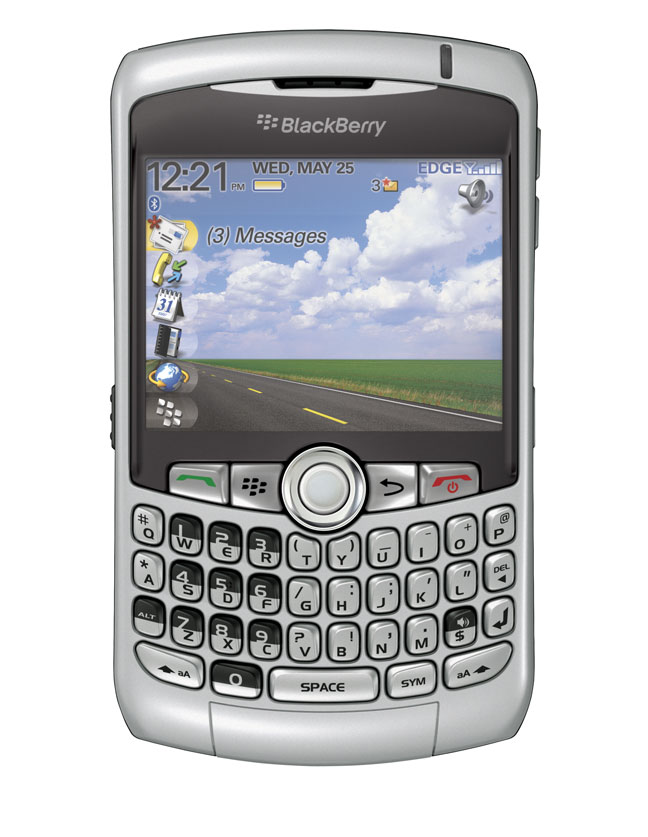
About three weeks ago when all the hype was going on I did something a little crazy. Maybe it was all the hype about the iPhone and what it could do, but I ended up getting myself a new cell phone. I was very happy with my Blackberry Pearl (8100) that I got at the end of November, and was getting use to not having the full qwerty keyboard and just trusting the phone software. Deep down I still wished for a full keyboard. I looked at the Blackberry 8800 but it didn’t have the multimedia features or the camera that I wanted (not that I really cared about the camera though).

In May of 2007 RIM released a new device, the Blackberry Curve (8300). It has all the same features that the Pearl has (MultiMedia, Camera, Mail etc) but also features a full qwerty keyboard. It is a little larger than the Pearl but is still smaller than the older Blackberry devices. It does not have the GPS that the 8800 does but I have a Bluetooth GPS receiver that works fine with both Blackberry Maps and Google Maps.
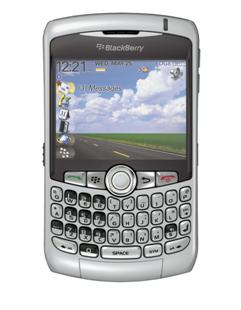
When my wife’s Motorola finally gave up the ghost and stopped charging, I looked on EBay and found a Curve that was selling for the same price as an upgrade for my wife’s plan would cost. I purchased the phone and anxiously awaited the Canada Post delivery.

The new phone was here by the end of the week. I pulled my SIM card from the Pearl and put my wife’s in it. Put my SIM card in the Curve and charged it up. I also added a 2 GB Micro SD card which allows me to store data and multimedia to the card. One thing that is similar to the Pearl is that the Micro SD card slot is located under the battery, so if you have a need to change cards frequently it is a little bit of a pain.

While the phone was charging, I went into my Blackberry Enterprise Server on my SBS 2003 server and reset the enterprise activation password for my account. Once the phone was charged all I had to do was on the Curve, go to Enterprise activation, put in my email address and the activation password and let the phone sync up. In a few minutes all of the data from my profile and email was all synced up.

I also use the Blackberry Internet Service on this phone for a couple of other email accounts. This is a service that is free that polls a pop3 email account and forwards messages to the device. Yes you can use both services (BES and BIS) at the same time. I set up the new pin in the BIS service website and resent the service books, bang the mail was forwarding to the new device.

I have now used the phone for about three weeks and have been very happy with it! The screen is very bright and can be seen in all types of light. It even automatically adjusts based on the light you are looking at it on. I have downloaded a couple of podcasts to the phone (converted with the included Roxio Media Manager) and it performs very well for displaying video, although the screen is small.

Voice quality and reception has been good, although due to my back injury I have not had a chance to try this in lots of places. The phone has a built in speaker phone and another unique feature is that the phone will adjust volume based on the ambient noise that it picks up around you. It is kind of weird the first time as the volume will go up without touching the controls. Voice dialing as in the Pearl is very good, you can either say a name or say a phone number, the phone will confirm and dial for you. I really like this feature and is something I am using constantly with my Bluetooth headset. I can make calls while the phone is securely clipped to the case on my belt.

Another feature that has been finally added to this Blackberry is a spell check. Yes no more misspelled words in your emails! As for typing, while the keys for the keyboard are actually a little small even, with my large fingers I have no problems typing as they have enough space between the keys. Something like sending a long email on my Pearl was a little trying, it has been an absolute breeze with the Curve.

Battery life- I have had some pretty good battery life from this device. Typically with my usage which includes web surfing, email, phone use taking pictures and Bluetooth I get about two to three days of use.

Camera – The phone features a 2 Megapixel camera with flash. With a Micro SD card you can store all of your photos to the card. There is also a 5X digital zoom. While the camera is okay in bright light pictures using the flash or taken in low light without the flash tend to be a bit noisy. The camera is fine if you want to snap a quick photo but I would consider using it for taking vacation photos!

One thing that I wish this phone has is WiFi so that I could connect to the internet wirelessly at home and save on downloading files via the slower edge connection.

One of the nice things about the Blackberry platform is that there are a fair number of third party applications for the phone. I have 4 already loaded up on the phone that I use on a regular basis. I have loaded a program called Mforms from http://www.skysoftsystems.com which allows you to build your own databases for the phone. For example I have created my own mileage tracking application for the BB and I can fill out the form and send it to my main email address for import into an Excel spreadsheet. I have installed the new audible air player which allows me to play my audio books on the device and actually download parts of my books from audible for listening. Another application is Jaikuberry which allows me to open and post to my Jaiku Presence Feed http://sysguy.jaiku.com. But I think the application I am looking most forward to hasn’t been released yet. The makers of Documents to Go, Dataviz will soon be releasing a Blackberry version of their software. http://www.dataviz.com/products/documentstogo/blackberry/index.html This will allow you to edit attachments on the Blackberry and gives the device a whole new use! Of course pricing is to be determined and I hope it is not as expensive as the other Office Application for the Blackberry.

In the box, you get the phone, battery, a USB Sync Charge Cable, a travel charger, a stereo headset, manuals and software CD. Am I happy that I got this phone? Yes! If I had to do it all over again would I do it? Again I have to say yes!

Got my Joost invite

After much searching yesterday, I finally found a Joost invite. I got it from Techcrunch.com. If you want an invite yourself to try out this service you can visting this site at Techcrunch http://www.techcrunch.com/2007/05/22/10000-joost-invites/ or as promised if you want an invite, please leave me a comment about this post with your name and email address filled in on the form and I will send them out until I run out (I don’t know how many I have but I have sent 2 out). Please note comments are moderated for spam and offensive content so they will not appear right away. To protect you from spam please do not include your email address in the message unless you use the email at maildomain dot com format.

It is a pretty cool IPTV video on demand service but I will reviewing it much more depth as I play with it. If you want to try it add your comments ASAP as it is first come first serve on the initiations I have.

Stephen

Easy File Sharing

I was reminded to try a program that I heard about today when a client wanted to share files between two firms. I got a call from the other IT guru about setting up an SFTP server so that they could transfer files. I suggested that we look at a new service on the web called Tubes. To learn more go to www.tubesnow.com.

Here is how tubes work. You sign up for a free account at the tubesnow website. Once set up you download and install the software on your PC. Once the software is installed you create a tube, and then invite users to it. They can then use the invitation and go to the tubesnow.com site and sign up for an account. They install the software and run it. The tube will now be available on their PC. You can invite more than one user to your tubes. When you are ready you drag and drop files from your PC to the tube. This will synchronize and people that you invited will now see the files on their own PC. They can also drag and drop files to the tube and they are shared between all of the invitees. Best of all it is free and easy to use. There are some limitations of the free version (you are limited to 2 devices and 2 GB of space). There is also a premium version available which increases the sharing limit to 5 GB, Full MS Office support, unlimited devices and backup and recovery! The cost of the premium version is 4.99 per month. Even with the free services you can upload MP3 files, photos, office documents and even programs.

There are also other solutions that are available that allow you to share files instead of sending email attachments. Check out www.yousendit.com or www.senduit.com. Both sites are similar. You can upload a file and send a link to it to people you want to share it with. The free services allow you to share files up to 100mb in size. Yousendit.com also has some limitations on number of downloads and bandwidth but they also offer paid services for as little as 4.99 per month. Senduit.com also gives you the ability to expire the file in as little as 30 minutes. These two services require no additional software installed on your PC or your friends PCs.

Just a few cool services that make it easier to send files instead of trying email to share.

Hope these services help you out.

Stephen

Buying on EBay

Occasionally I do find items on EBay that I want to buy. I have found a cool tool that helps me with my EBay purchases and would be lost without. I use a sniping service for just about everything I buy on there for a couple of different reasons. Check out http://www.auctionstealer.ca (if in Canada) or http://www.auctionstealer.com if outside.

Auctionstealer is a free (premium services available) sniping services for online auctions. With the free account you can snipe up to 3 auctions a week with a 10 second buffer. There are also other restrictions on the free service but I have not found any problems with them. You can purchase a premium membership (per item, monthly or yearly) that allows you to have a shorter buffer. How does it work?

You sign up for your auction stealer account and you have to provide them with your EBay ID and Password. Once your account is set up, then you input the item number in the auctions section. It confirms that the item is valid and pulls the information. You place your maximum bid and the number of items you want to purchase and save the selection. What will happen is that with the free service, their system will log in to the item and place a bid on your behalf 10 seconds before the auction closes. You can change your bid at any time (I have done it as close as 4 minutes from auction close), or even cancel it. So far I have been very successful using the service (I got a Nintendo Wii and a Pocket PC this way). Purchase of Premium service per item (costs 2.00) can allow the system to place your bid up to 2 seconds before the auction close.

Why I use it.
There are several reasons why I use the sniping service. Firstly and to me the most important reason, is that it gives me an option to change my mind on an item. For example, let’s say I want to buy something and place a bid on EBay (my max bid). Then I decide I don’t actually want the item or I think my bid was too high. If the bid was placed on EBay, because you can’t withdraw your bid you have to hope that someone outbids you and if you bid too high that may not happen. Since Auctionstealer does not place the bid until 10 seconds before auction end, you can cancel the automated service if you change your mind, and since you have not bid there are no repercussions. Secondly, I find that it prevents bidding wars between myself and other buyers including some unscrupulous sellers that bid items up with a different ID. This way because I am not actively bidding I do not get carried away. If the price goes too high, I cancel my snipe. Thirdly it allows you to bid on auctions that close when you may not be at your computer system. The Auctionstealer system actually checks the item an hour or two prior to close to see if your bid is too low. If it is it sends out an email notification. This way you can check from any internet connected PC and adjust your bidding if you want or just plain cancel the item.

I am sure using this tool does upset some people, (I know I was upset once when I was sure I won something and then got sniped), but I have found that it has saved me a lot of money and removed the Doh factor (“Doh, I really shouldn’t of bid that much”) while I am buying on EBay.

If you are a serious EBayer, you may really want to look at using this tool.

Stephen