My request to join the Microsoft Live Mesh Technology Preview program (http://www.mesh.com) was accepted today and I have just finished installing on a couple of PCs to test it out. Live Mesh is a service that will allow you to synchronize files and folder to a central location that you can share between your PCs as well as giving you the ability to remotely access your devices. You can do many of the things that Live Mesh does right now (also for free) using a variety of technologies, however this puts all of it in one place and one simple application. Currently Mesh only supports Windows based PCs but in the future it will have MAC and mobile device support.
When you first log on to Mesh using your Windows Live ID, you see your Live Desktop (with 5 GB of space) as well as devices and the option to add a device. The first step is to add a device (currently only Vista and XP PCs). You download and install the client software (less than 2Mb) then add your Live ID and password. After the software installation has completed you then see the PC as a device in the Mesh. Once your PC shows up in the Mesh you can add folders to synchronize to the Live Desktop simply by going to explorer, right clicking and selecting "add folder to your Live Mesh". The folder will now appear in your Live Mesh Live desktop and you can access it via the web.
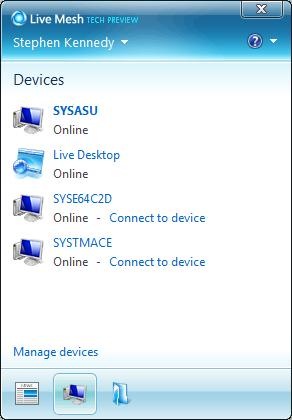
 You don’t have to directly access the Live Mesh website to see your devices and desktop either. When installed a piece of software that runs in your system tray called the notifier allows you to see devices, recently added folders and to connect to devices. If you click on Live Desktop it will open the Live Mesh website. From here you also select the folders that you would like to synchronize with the PC.
If you have more than one computer and you install Mesh on each PC you can synchronize the folders between PCs. After adding a folder to your Live desktop from one PC, you go into the notifier (system tray application), select manage folders and then select the folder to sync somewhere to your PC. Adding something to this desktop synchronizes it down to the other PC.
Remote Desktop. Also from your Mesh home page you can remotely connect to any devices that have been added, allowing you to drag and drop files between PCs or work the desktop like you are sitting in front of it. I on my Vista Ultimate and XP Pro systems this works fine. I wanted to test it on my wife’s Vista Home Premium laptop but I have been having software issues trying to get it installed on there. XP Home and Vista Home Premium and lower have remote access built in but it is disabled. Right now I can’t say that this will give it remote access. Windows Home Server does not give this access to XP Home or Vista Home Premium. I have read reports though that Live Mesh does in fact allow Remote Desktop to XP Home and Vista Home Premium machines. Does Microsoft now realize that this is becoming a needed feature for home users too. This is something that I suggested being added to Windows Home Server when I was in the beta program.
Alternatives. As I stated earlier you can accomplish this with several technologies now that are either free or at a low cost. Using the free service at www.logmein.com you can install the client on your PC and connect to your PC from any web browser in the world (including Firefox). Logmein also works on Macs right now. If you have a Windows Home Server you can also access files that are stored there via a web browser and remote control desktops running Windows Vista Business or better or Windows XP pro. Logmein also works with XP Home and Vista Home Premium.
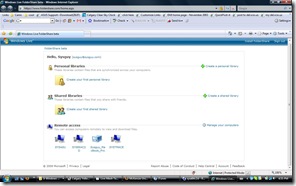 As for sharing files and folders, that can also be accomplished with another free Microsoft Application that also works on MACS. http://www.foldershare.com is a small application that you can download on to your PC or Mac and share files from any connected PC or via a website. I believe that the Foldershare technology is built in to Live Mesh, but unless you sync the folders to your Live Desktop or connect via remote desktop you don’t have access to them. I chalk this up as a strength of Foldershare. See a screen capture of my Foldershare site on the left.
If you want an online storage folder with the ability to share drives, you can use Microsoft Live Skydrive http://skydrive.live.com. Again this is a free service that allows you to store up to 5 GB of files on the web, maintaining private access or sharing with friends or everyone.
You can also do most of what Live Mesh offers if you have a Windows Home Server. You can add file sharing for all PCs and remote desktop (for XP Pro or Vista Business or better). However Vista home server also has add-on capability so you can add a lot more functionality to your home server (off site backup, photo galleries etc) in addition to expandable storage and data protection.
Conclusion. The idea of Mesh is not new at all. As I ave written you can do all of these things now except that you need other applications. There will be more functionality once you can install the software on Macs and mobile devices. It will be interesting to see if you will be able to remote control a Mac using the application but somehow I don’t think that this i possible. If you have multiple PCs and are mobile with a laptop, Live Mesh may be something that you are interested in.