
I am in the process of playing with and testing several new gadgets that I picked up this summer. Keep an eye out as we will have reviews of the Nokia N800 Internet Tablet, RCA Small Wonder Digital Video Cameras, Canon HV20 HI Def Camcorder, Gary Fong’s Light Sphere II, The ION USB Turntable and maybe the Toshiba HD AH 2 HD DVD player (still not sure if I am keeping that one).
Windows Home Server Update
Uh oh the Internet crashed!
This has been out for a bit now but it is funny and deserves a look.
Breaking News: All Online Data Lost After Internet Crash
Doh – Did I act too soon!
You may have read my review of the Blackberry Curve that I wrote just a while ago https://sysguy.com/wordpress/?p=165. Well the day after writing the review I started having problems with battery life. The phone was going through it’s charge in a day and a half even after it was turned off at night. Neither was there heavy email or even voice usuage on the phone. At first I thought it might be because of a low signal where I had the phone, after moving the phone there was no difference. Well I set the backlight to 30% (which is not noticeable to most people) but then I noticed something. I was getting a number of messages from Twitter via the google talk client. Turns out my Google talk client was running the whole time. This is what was draining the batterries of the unit. I signed off Google talk and the last charge lasted 5 days again!
But now going to the subject line of my post. While looking for solutions to my battery life problem, I stumbled upon some blogs with product leaks for Blackberries, in particular a new Curve 2, Pearl 2 and 8800 V2 phone. It would appear that CDMA versions of these phones are coming out (Telus and Bell customers will be able to get them) but the biggest feature on the new GSM versions is the addition of WiFi (802.11bg)! Apparently these phones will seemlessly switch from Edge to 802 seamlessly for mail downloads and we browsing. his is the one feature that I wish my current Curve had because it lowers data costs for mail and web surfing and it is much faster than the edge network. Although I have also seen that Rogers is testing their new HSPDA in some of the major centres (Calgary, Vancouver) I have seen no indication that these phones will be able to connect on that network.
Rumours have the phones coming out in the US sometime between September and December so they should not be far behind here. Well I am happy as I am eligible for an upgrade frome Rogers December 1 of this year so I will keep watching.
New Vista Performance Patches Released Yesterday
On Tuesday August 7th, Microsoft released a couple of patches for Windows Vista. One deals with Vista performance and the other deals with Reliability and compatibility. These patches are available for download as standalone patches and I am not sure if they will show up next week under the scheduled patch Tuesday downloads in Microsoft Update. I have applied both patches to two of my Windows Vista systems so far. I noticed very little difference on my Vista Ultimate Asus laptop with 2 GB of Ram after applying the patch. I did notice however a huge difference on my Intel Core 2 Duo desktop machine that has 4 GB of ram. As I had posted earlier the upgrade from 2 to 4 GB of RAM on that machine was not as smooth as I would have liked. After the upgrade the machine seemed like it would pause from time to time, It never displayed this with only 2 GB of RAM and would only occur for a few seconds. Various combinations of RAM sticks would make it worse or better. In the end, I found that 4 double sided RAM sticks ran better but the machine would still occasionally pause for up to a minute.
Since the performance patch directly indicated that it addressed memory management I applied that as soon as I got it last night. I have been using the machine (albeit via remote desktop) all day and there definitely seems to be an improvement in it’s performance and have not seen it hang all day. I have not tried it enough after the compatibility and reliability patch all that much to see whether there has been a difference.
Here are links to the Microsoft KB articles regarding the contents of the patches, and these articles contain links to the download site. Please note that you have to validate your copy of Vista as genuine.
Performance Patch KB Link
http://support.microsoft.com/kb/938979/en-us
Reliability and Compatibility KB link
http://support.microsoft.com/kb/938194/en-us
I would suggest that anyone running Vista may benefit by installing these two patches
Stephen
Spend a little save big on long distance!
Actually we have a really good long distance deal from our home telephone provider. For over two years now our home provider has been our cable company, Shaw Communications. For 55.00 CAN a month we get unlimited calling anywhere in North America any time of day, and 1000 minutes of International calling to select countries although we have never used it. In addition we get a bundle of phone services like voicemail , call display, three way calling and more included. All in all, I know that this bundle has saved us at least 25.00 a month (and probably a lot more) over Telus who was our previous phone provider and in addition we no longer worry what time it is before we make a long distance call.
For a business line, I use Vonage Canada that provides 500 minutes of outgoing voice calling anywhere in North America, and 250 minutes of outgoing fax calls on a separate fax line for 32.00 per month. This is also a good deal as voice quality has been good with Vonage and the reliability has been fine. One of my favorite Vonage features is the ability to have voicemail messages sent via email. Currently I have these attachments sent to my main email address and my Blackberry’s address, In addition you can listen to and manage your voicemail messages via the Vonage web site.
For some people though Vonage may not be an option. In order to use their service you require a high speed internet connection and if you are Telus DSL customer you will still need a telephone line as Telus does not offer a service called Naked DSL (a DSL connection that is not tied to a phone line). This eliminates the ability for some people to use the Vonage service or at least it makes no real sense to use the service.
Enter a third option, Skype. Skype started out as a PC to PC VOIP Service, but for some time now have also been offering PC to Phone calls. In fact from the summer of 2006 till January 1 2007 Skype was offering this service free. Now they no longer offer the free service but the service costs very little. In fact if you have a high speed internet connection and are willing to make phone calls with your PC you can save a bundle on long distance.
Skype offers a service called SKYPE unlimited where for 35.00 CAN (29.95 USD), you can call from within North America to any phone line with no limits on the time you talk or the time of day! I have recently signed up for this service and the first test call I made worked very well. My laptop was connected to my home wireless network and I used the connection to call my wife that was in Winnipeg. Using a good headset (Plantronics DSP 400), on my end, the call sounded crystal clear. On her end she indicated that the call sounded a little fuzzy but was not bad. There was no problem with delays.
So why, if I have a great long distance plan like I have, would I want a service like this? Well there are a couple of reasons. If I travel, I can take my connection with me. This means if I am staying in a Hotel that offers Internet Access I can use my laptop to make phone calls as opposed to using my cell or the hotel line (providing they don’t block the ports as some do). Or if I am a client site I can use this to call anywhere. If I am visiting friends I do not need their phone line to make calls I can just borrow their Internet connection and make calls that way. The main reason why I purchased this though is for my upcoming podcasts. With the equipment that I have I can easily record SKYPE calls so I can conduct telephone interviews and record them for use in podcasts later.
Skype also offers free PC to PC phone calls all across the globe as well.
So what do you need? All you need is the Skype Software (free download), a Skype Account, Speakers and a Microphone (although a chat headset works best). So for less than 60.00 CAN, you can have free phone calls to anywhere in North America for a year. If you have a web cam, you can make video calls to other Skype users across the net. In addition several manufactures sell cordless Skype phones that connect to your router and operate like a regular phone in your house for making calls. More information is available at http://www.skype.com.
Skype has been around for a while and there are owned by EBay, so you know they are financially sound. You can save yourself a lot on your long distance if use Skype unlimited for your outgoing calls. For more information visit Skype at:
http://www.skype.com/products/skypeout/
A caution though, Skype is not a home phone replacement! You cannot make emergency calls from Skype and if you just purchase the Skype unlimited service you do not get an incoming phone number. Incoming numbers (Skype In service) is available for a monthly cost.
If you decide to look into Skype and try it, make sure you contact us. Our Skype ID is sysguy!
First podcast coming soon
We are getting ready to produce and release the first episode of the Sysguy Show podcast. This podcast will feature reviews of products, tech news, troubleshooting tips special guests and more. We will also answer some of our readers questions about technology and how to do things or troubleshooting. If you have a question you would like addressed in the show please email use at questions at sysguy dot com. If your question is chosen you will receive an email about when you can expect your question to be answered and posted.
I look forward to hearing from you all soon
Stephen the Sysguy
Out of the Box Review – The Blackberry Curve (8300)
About three weeks ago when all the hype was going on I did something a little crazy. Maybe it was all the hype about the iPhone and what it could do, but I ended up getting myself a new cell phone. I was very happy with my Blackberry Pearl (8100) that I got at the end of November, and was getting use to not having the full qwerty keyboard and just trusting the phone software. Deep down I still wished for a full keyboard. I looked at the Blackberry 8800 but it didn’t have the multimedia features or the camera that I wanted (not that I really cared about the camera though).
In May of 2007 RIM released a new device, the Blackberry Curve (8300). It has all the same features that the Pearl has (MultiMedia, Camera, Mail etc) but also features a full qwerty keyboard. It is a little larger than the Pearl but is still smaller than the older Blackberry devices. It does not have the GPS that the 8800 does but I have a Bluetooth GPS receiver that works fine with both Blackberry Maps and 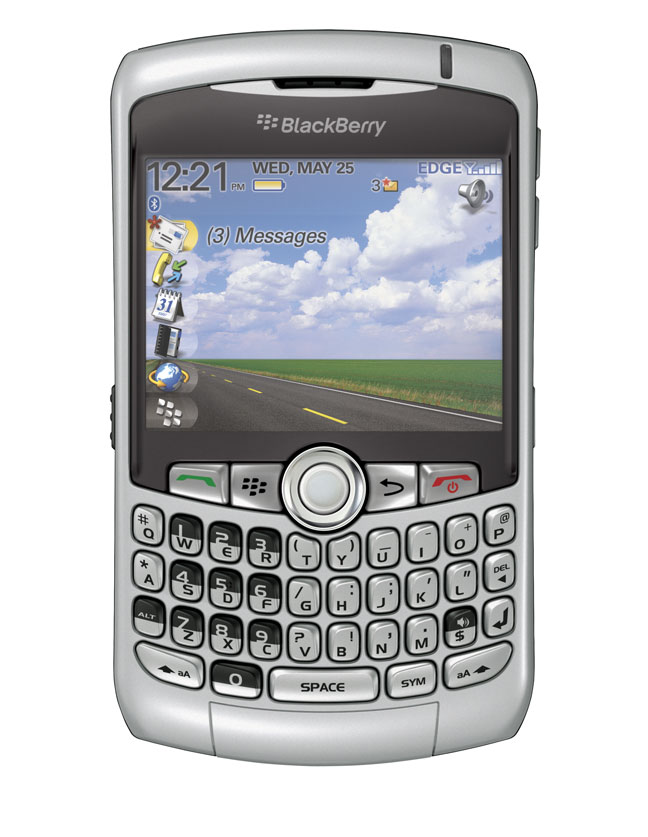 Google Maps.
When my wife’s Motorola finally gave up the ghost and stopped charging, I looked on EBay and found a Curve that was selling for the same price as an upgrade for my wife’s plan would cost. I purchased the phone and anxiously awaited the Canada Post delivery.
The new phone was here by the end of the week. I pulled my SIM card from the Pearl and put my wife’s in it. Put my SIM card in the Curve and charged it up. I also added a 2 GB Micro SD card which allows me to store data and multimedia to the card. One thing that is similar to the Pearl is that the Micro SD card slot is located under the battery, so if you have a need to change cards frequently it is a little bit of a pain.
While the phone was charging, I went into my Blackberry Enterprise Server on my SBS 2003 server and reset the enterprise activation password for my account. Once the phone was charged all I had to do was on the Curve, go to Enterprise activation, put in my email address and the activation password and let the phone sync up. In a few minutes all of the data from my profile and email was all synced up.
I also use the Blackberry Internet Service on this phone for a couple of other email accounts. This is a service that is free that polls a pop3 email account and forwards messages to the device. Yes you can use both services (BES and BIS) at the same time. I set up the new pin in the BIS service website and resent the service books, bang the mail was forwarding to the new device.
I have now used the phone for about three weeks and have been very happy with it! The screen is very bright and can be seen in all types of light. It even automatically adjusts based on the light you are looking at it on. I have downloaded a couple of podcasts to the phone (converted with the included Roxio Media Manager) and it performs very well for displaying video, although the screen is small.
Voice quality and reception has been good, although due to my back injury I have not had a chance to try this in lots of places. The phone has a built in speaker phone and another unique feature is that the phone will adjust volume based on the ambient noise that it picks up around you. It is kind of weird the first time as the volume will go up without touching the controls. Voice dialing as in the Pearl is very good, you can either say a name or say a phone number, the phone will confirm and dial for you. I really like this feature and is something I am using constantly with my Bluetooth headset. I can make calls while the phone is securely clipped to the case on my belt.
Another feature that has been finally added to this Blackberry is a spell check. Yes no more misspelled words in your emails! As for typing, while the keys for the keyboard are actually a little small even, with my large fingers I have no problems typing as they have enough space between the keys. Something like sending a long email on my Pearl was a little trying, it has been an absolute breeze with the Curve.
Battery life- I have had some pretty good battery life from this device. Typically with my usage which includes web surfing, email, phone use taking pictures and Bluetooth I get about two to three days of use.
Camera – The phone features a 2 Megapixel camera with flash. With a Micro SD card you can store all of your photos to the card. There is also a 5X digital zoom. While the camera is okay in bright light pictures using the flash or taken in low light without the flash tend to be a bit noisy. The camera is fine if you want to snap a quick photo but I would consider using it for taking vacation photos!
One thing that I wish this phone has is WiFi so that I could connect to the internet wirelessly at home and save on downloading files via the slower edge connection.
One of the nice things about the Blackberry platform is that there are a fair number of third party applications for the phone. I have 4 already loaded up on the phone that I use on a regular basis. I have loaded a program called Mforms from http://www.skysoftsystems.com which allows you to build your own databases for the phone. For example I have created my own mileage tracking application for the BB and I can fill out the form and send it to my main email address for import into an Excel spreadsheet. I have installed the new audible air player which allows me to play my audio books on the device and actually download parts of my books from audible for listening. Another application is Jaikuberry which allows me to open and post to my Jaiku Presence Feed http://sysguy.jaiku.com. But I think the application I am looking most forward to hasn’t been released yet. The makers of Documents to Go, Dataviz will soon be releasing a Blackberry version of their software. http://www.dataviz.com/products/documentstogo/blackberry/index.html This will allow you to edit attachments on the Blackberry and gives the device a whole new use! Of course pricing is to be determined and I hope it is not as expensive as the other Office Application for the Blackberry.
In the box, you get the phone, battery, a USB Sync Charge Cable, a travel charger, a stereo headset, manuals and software CD. Am I happy that I got this phone? Yes! If I had to do it all over again would I do it? Again I have to say yes!
Intel Wireless Card Woes
I wasn’t going to post a full blog entry for this, but was going to post it to my mini blog instead (http://sysguy.tumblr.com). Then I decided that other folks may benefit from this too, and the rant will be a little longer than I thought so I will post it here.
I have been having issues of late trying to hook up my Asus laptop to one of my wireless networks here at home, and yes I did say one of my wireless networks. With my back problems I have been working from home and off of my laptops of late connecting via remote desktop to my main PC. Rather than run 3 cables to the laptops I need I was hoping to hook up via wireless to do my work.
When I said wireless networks I did mean more than 1. At home I run up to 5 wireless networks at the same. My main network has an older Netgear WG602 Access point with one SSID and a Linksys WRV 200 router with two SSIDs set up on it, one is WPA security and the other is WEP for a couple of devices that don’t have WPA ability. My SBS 2003 server network has a Belkin N1 Wireless router set up in Access Point mode (I am testing the N speeds) and there is another Linksys WRV 200 with a wireless network set up for a new MS server I am in the beta program for. I am currently trying to connect to laptops to the various networks. My Asus Z62FM custom built machine with Vista Ultimate and an Intel 3945 ABG Mini PCI-E wireless card in it and my new Acer TM6292 laptop (Out of the box review coming soon) with an Intel 4965 ABGN mini PCI-E card in it and Windows XP Pro.
I know what many will say is that the interference from the networks is causing the problem, but I don’t think that this is the reason. All of the SSIDs are different and the devices are set for different channels. The Netgear on 11, the Main Linksys on 6 and the Belkin on 1. The Linksys on the beta server is currently disabled.
Let me start with the Acer machine. This one took a while to fix but I did fix it and it was strange. I updated the drivers to the latest Intel drivers for the card and could not see any of my wireless networks except for the one on Channel 11. I checked the settings on the card and could not figure it out at all. If I moved away from the other two wireless laptops that were there I could then see and connect to the other networks. But if I happened to lose the connection I could not re establish it without moving away again. I uninstalled and reinstalled the drivers several time. Finally I tried changing the ad hoc channel settings to channel 6. All of a sudden I could see the two SSIDs. This really shouldn’t be happening at these SSIDs are set up for infrastructure mode and not AD HOC mode. I have since been able to connect without problems and have been able to now see all of the three networks I have set up.
The 4965 card does have the problem that other Intel wireless cards have in that it will after a long period of time drop the connection. Re-establishing the connection usually involves disabling and re enabling the card in the Control Panel Network Icon. The problem also occurs after bringing the machine out of sleep mode or hibernation mode.
On my Vista Asus machine the problem seems to be specifically pointing at the network card itself. I have tried several fixes that I have found on the net and none seem to work. Again I was only seeing the network that was on Channel 11 (this is the default ad hoc channel setting in the Intel driver). Changing it to channel 6 allowed me to see the SSIDS on that channel. But for some reason I cannot connect to any of the networks. Nothing I tried worked (enabling/disabling the card, registry hacks from MS knowledgebase, disabling IP6). Finally I put in an old Netgear WG511 PCMCIA wireless card in the system and boom, I could see all of the SSID’s and connect to any network. There were a couple of problems that Vista identified that the router did not support and it offered to fix those. Once that was complete the card was stable and would connect fine. After a while I removed the card and connected with the Intel card and everything was fine for a couple of hours with it. After installing more software and rebooting the machine, I found I could not get connected with the Intel card but again had no problems with the Netgear card. Now this Vista machine has been newly reimaged twice this month (a couple of weeks ago I did it because of wireless problems) as well) and this last time I tried default Vista drivers, as well as the latest Intel ones.
I have picked up a used Dell DW1500 Mini PCI-E card from EBay to try in this machine. This card does feature the Draft n spec but I am more concerned about the connectivity of the machine. This card is based on the Broadcom chipset, and if it performs like the Broadcom card in my wife’s Acer I should be fine. I hate the idea of having to carry around a second wireless card in case I can’t connect with the one that I have.
Of course I will no longer be able to say that the laptop is a Centrino Duo after the change because one of the components will be gone (the Intel wireless card) but if this card works I will be happy. Watch here for an update after the card arrives and is installed.
Â
Strange Vista Networking Problem.
I have recently run into a strange problem with my main Windows Vista Ultimate system and my networking. So far both times that it happened to me were after Windows automatically applied Windows Updates and rebooted. The machine is based on an Intel Board with an Intel on board Gigabit Nic. It has been more of an issue lately as with my back injury (I can’t sit down) I have been using remote desktop to connect from my laptop down to my main machine to use some applications or access data.
I have tried to connect via remote desktop back to my machine but the desktop would not respond. I checked the machine and it was powered up and sitting at the log in screen. Logging in and checking the networks showed that the machine was connected to two networks, my own (private) and an unidentified network (public). There is only 1 network adaptor and no Bluetooth or wireless in this machine. Furthermore it was showing local only as connectivity.
Running diagnose and repair indicated that there were two network connections and to disconnect 1 and try again. Disconnecting the cable did no good. The first time this happened it solved itself after a reboot, when it happened today two reboots did not solve the problem. Finally I disabled the network card and re-enabled it and this solved the problem.
I am still not sure if this was caused when the machine rebooted when remote desktop was connected or if there was another reason. I will watch it a little more closely and see if the problem crops up again.